For contractors who hire subs
Subcontractor Compliance Tracker: COI Expiry, W-9, 1099-NEC & Lien Waivers (Excel + Google Sheets)
Track every sub's insurance expiry, W-9, 1099-NEC total and lien waivers in one workbook. Red, orange and yellow flags at 0, 14 and 30 days. For contractors who hire subs.
Instant download (zip with BLANK + SAMPLE .xlsx). Excel 2016+ and Google Sheets. No macros, no subscription. 14-day no-questions refund.
Pairs with the 1099 Tax, Expense & Mileage Tracker (your own taxes) and the Change Order & T&M Ticket Log.
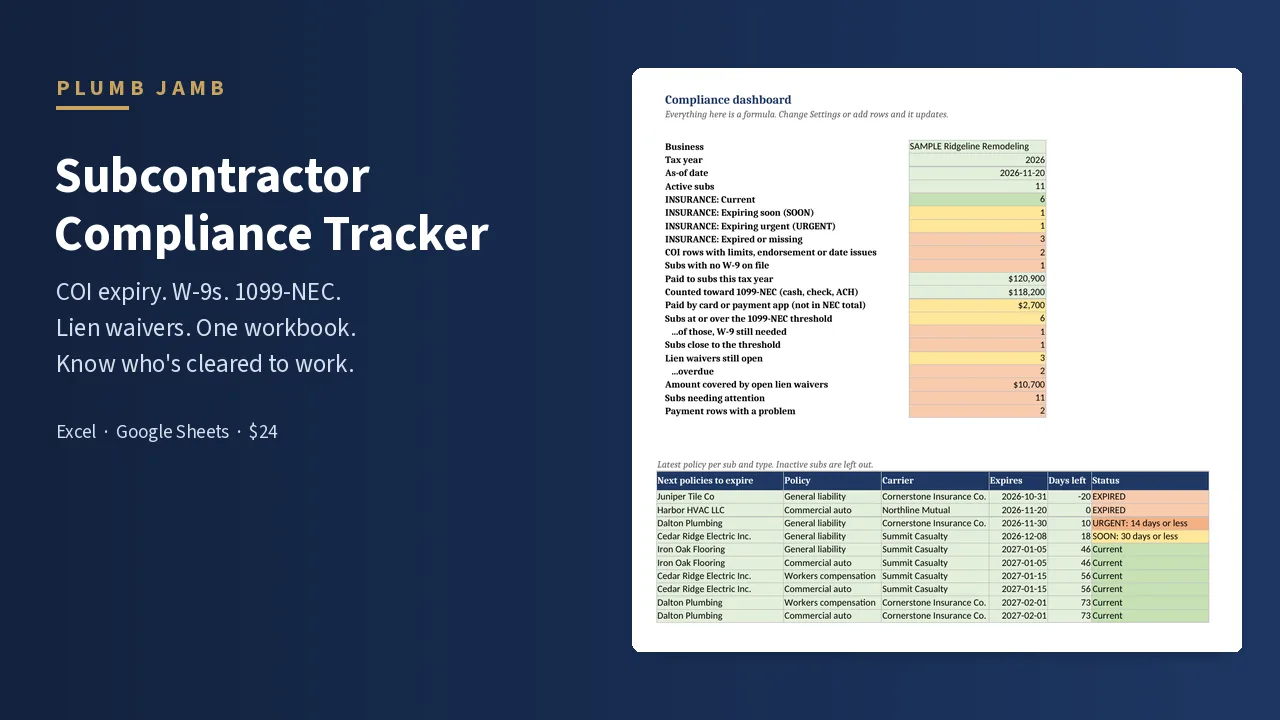
Screenshots (sample job)
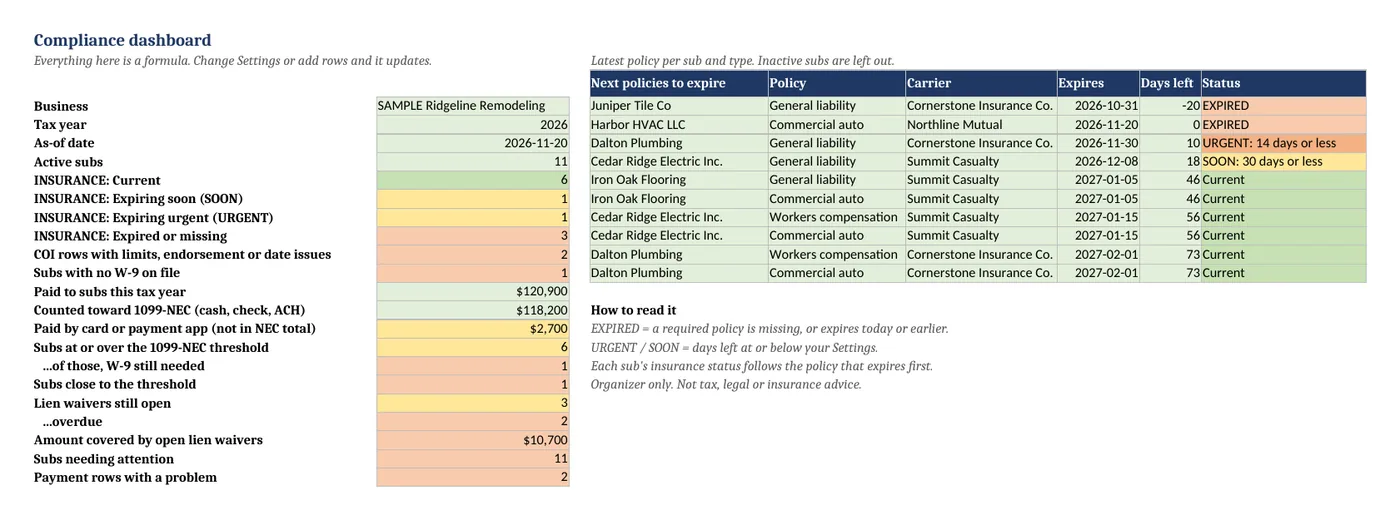
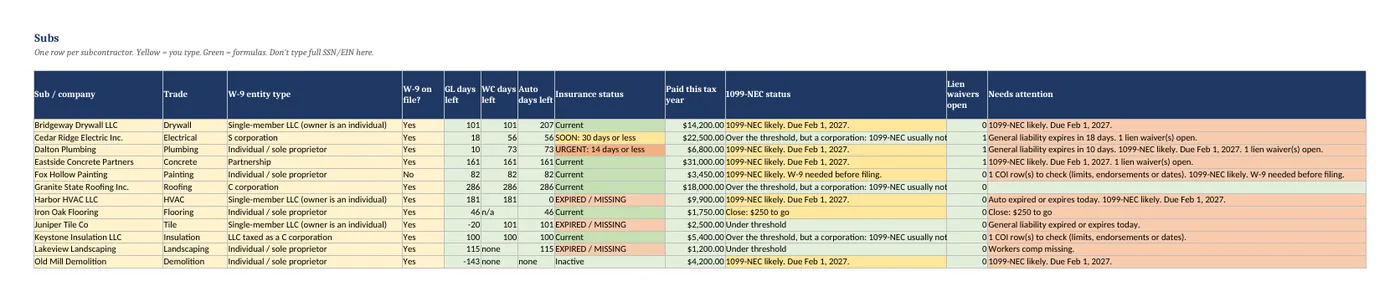
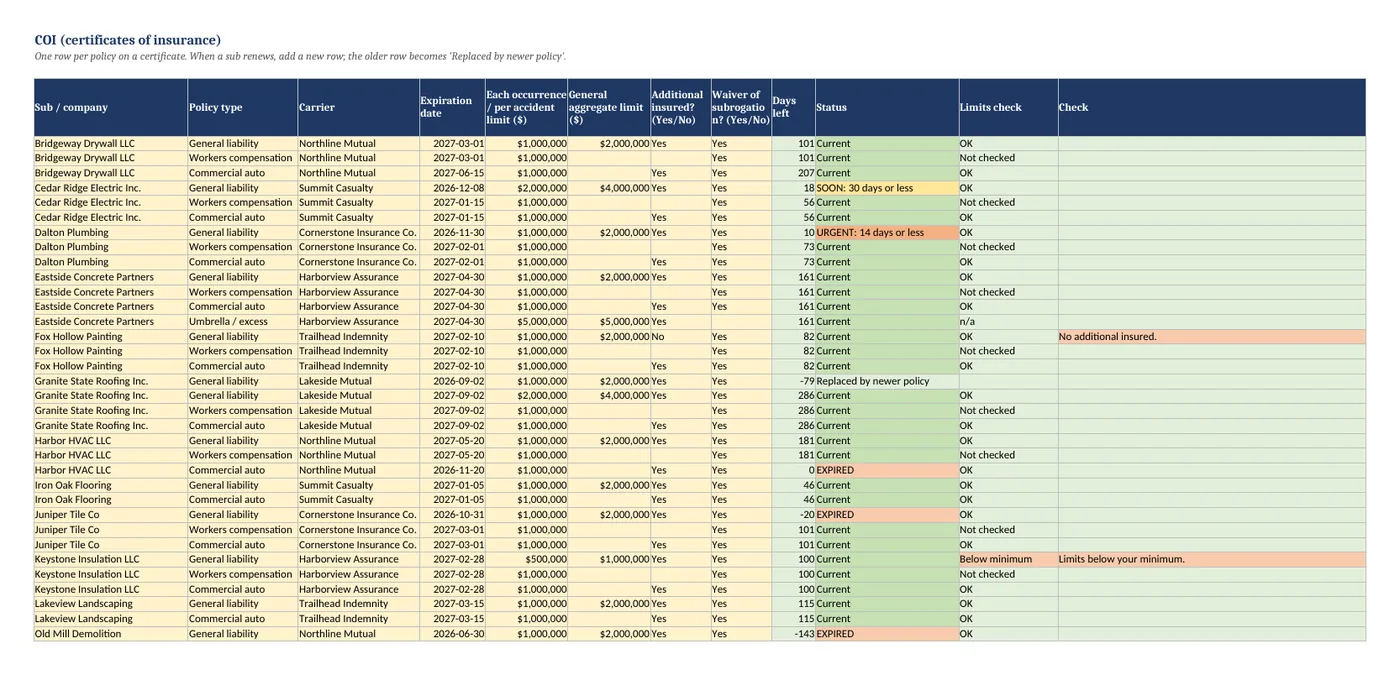
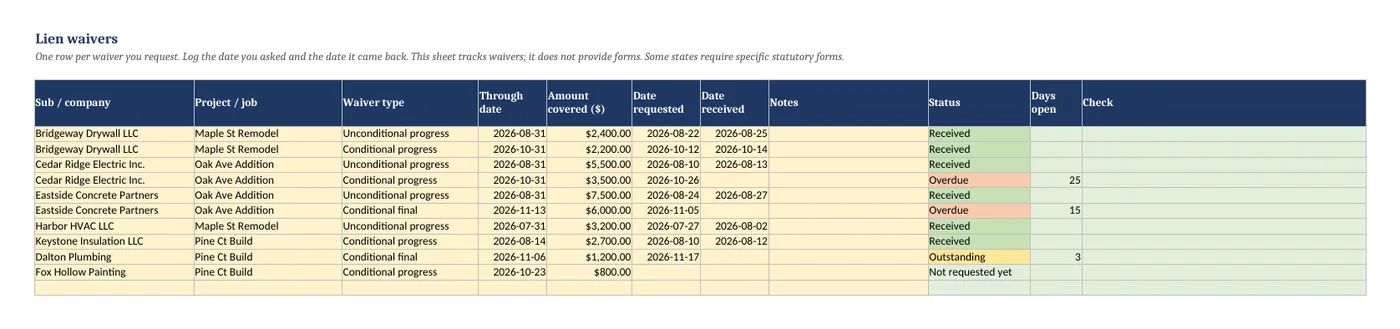
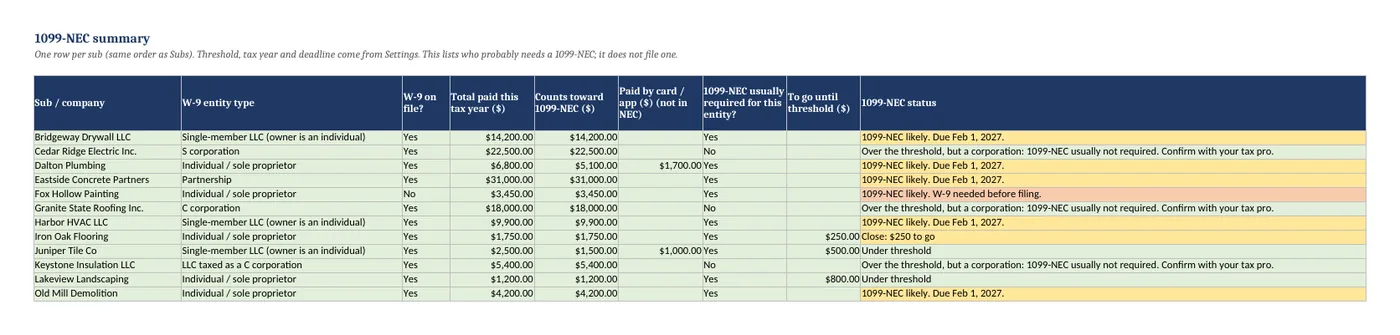
Know who's covered, who sent a W-9, and who needs a 1099, before you cut the check.
If you hire subs, three pieces of paper quietly cause trouble: a certificate of insurance that expired last month, a W-9 you never got, and a lien waiver that never came back. This workbook keeps all three in one file and flags the ones that need a look.
What's inside
- COI: one row per policy (general liability, workers' comp, commercial auto, umbrella). Carrier, policy number, dates, limits, additional insured, waiver of subrogation
- Expiry flags: red at 0 days or expired or missing, orange at 14 days or fewer, yellow at 30 days or fewer. Both numbers are yours to change. A renewal is a new row; the old one shows "Replaced by newer policy"
- Limits check: general liability, aggregate and auto limits compared with the minimums you set
- Subs: contact, W-9 entity type, W-9 on file, whether you require workers' comp and auto from each sub, and one "Needs attention" line in plain English
- Payments: one row per payment. Card and payment-app payments are kept out of the 1099-NEC total, because the processor reports those on a 1099-K
- 1099 Summary: total per sub, who is at or over the $2,000 threshold for payments made in 2026, who is close, and whose W-9 is missing. Corporations are marked as usually not needing a 1099-NEC
- Lien Waivers: type, amount, date requested, date received, Outstanding or Overdue
- Dashboard: counts of current, expiring, urgent and expired subs, open lien waivers, W-9s missing, 1099-NEC subs, and the next 10 policies to expire
What it checks for you
- A required policy that is missing or expired
- General liability, aggregate or auto limits below your minimum
- No additional insured or waiver of subrogation (turn these checks on or off)
- Subs with no W-9, or over the 1099-NEC threshold with no W-9
- Payments to someone not on your Subs list, or dated outside the tax year
- Lien waivers requested but not returned
Who it's for
General contractors, remodelers, builders, property managers and trade businesses that hire subcontractors, from a few subs to a couple hundred. It holds up to 200 subs, 600 policy rows, 2,000 payments and 500 lien waivers.
Important
An organizer only. It tracks dates, amounts and checkboxes you enter. It does not verify certificates, file 1099s, provide lien waiver forms, or give tax, legal or insurance advice. A certificate of insurance is a snapshot, not a guarantee of coverage. The 1099-NEC threshold ($2,000 for 2026 payments, $600 before) and the entity-type table are editable and shown with their IRS source. Lien waiver rules and forms vary by state. Confirm with a tax professional, your insurance agent or an attorney. Don't type full Social Security or EIN numbers into the workbook.
Compatibility
Excel 2016 or later (Windows or Mac) and Google Sheets. In Sheets, upload the .xlsx to Drive and open it with Google Sheets, importing the whole file. No macros, no subscription.
License
One business. Use it every year. Don't share or resell the files.
Refunds
If the workbook isn't useful, email us within 14 days of purchase and we'll refund you in full, no questions asked. After 14 days we still help if a file won't open or a formula is broken.
AI-use disclosure
The spreadsheet layout, formulas and listing text were drafted with AI tools and then reviewed, tested and corrected by us. Sample names, policy numbers and amounts are made up.
Questions or a file that won't open? Email 1c071a70@mail.grokbot.com.
Refunds and support
If the workbook isn’t useful, email us within 14 days of purchase and we’ll refund you in full, no questions asked. After 14 days we still help if a file won’t open or a formula is broken: 1c071a70@mail.grokbot.com.
AI-use disclosure
The spreadsheet layout, formulas and text were drafted with AI tools and then reviewed, tested and corrected by us. Sample names, prices and amounts are placeholders for fictional projects.
Instant download (zip with BLANK + SAMPLE .xlsx). Excel 2016+ and Google Sheets. No macros, no subscription. 14-day no-questions refund.
Also from Plumb Jamb
- Door & Hardware Takeoff Workbook ($39)
- Finish Carpentry & Trim Takeoff Workbook ($39)
- Change Order & T&M Ticket Log for Subcontractors ($29)
- 1099 Tax, Expense & Mileage Tracker for the Trades ($19)
- Contractor Job Costing & Estimate Workbook ($29)
- Div 06-08 Estimator Bundle ($79)
- Contractor Office Bundle ($59)
- Free Door Schedule Starter