For 1099 tradespeople
1099 Tax, Expense & Mileage Tracker for the Trades (Excel + Google Sheets)
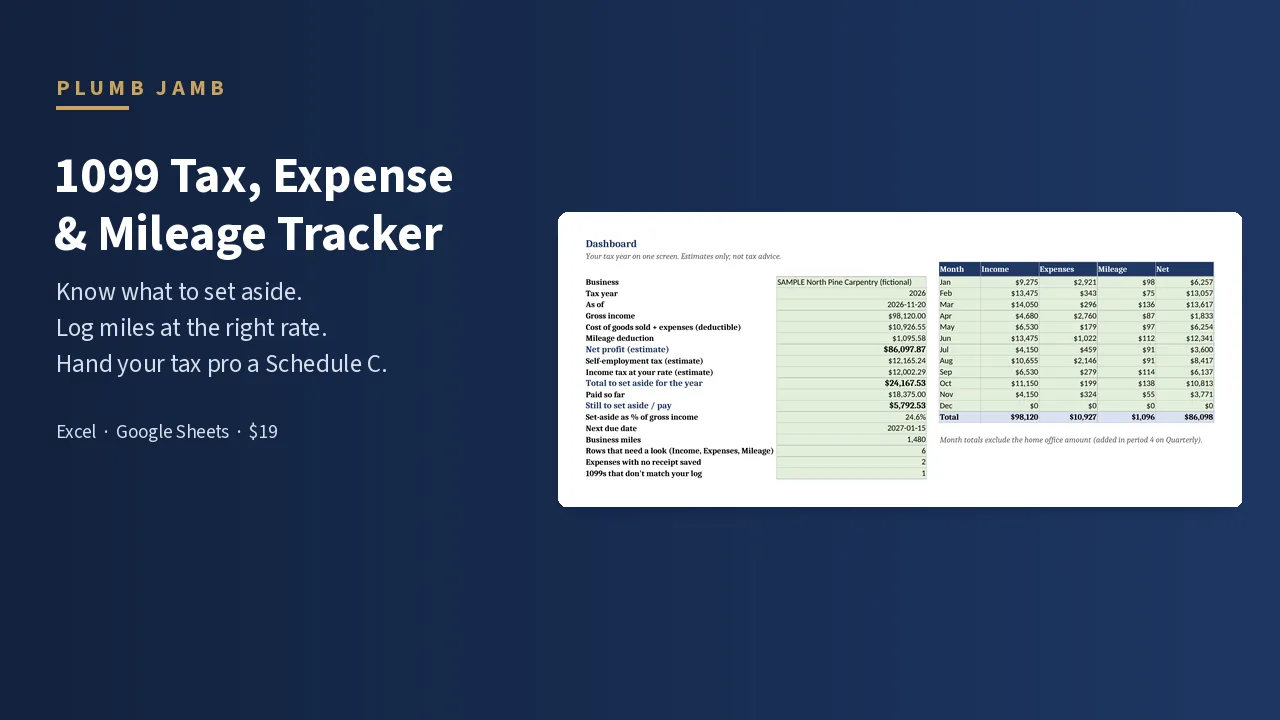
Log payments, receipts and miles. See your Schedule C numbers, what to set aside for taxes, and what's due each quarter. Built for self-employed tradespeople.
Instant download (zip with BLANK + SAMPLE .xlsx). Excel 2016+ and Google Sheets. No macros, no subscription. 14-day no-questions refund.
Save with the Contractor Office Bundle: all 3 workbooks for $59 (separately $77). Pairs with the Job Costing & Estimate Workbook and the Change Order & T&M Ticket Log.
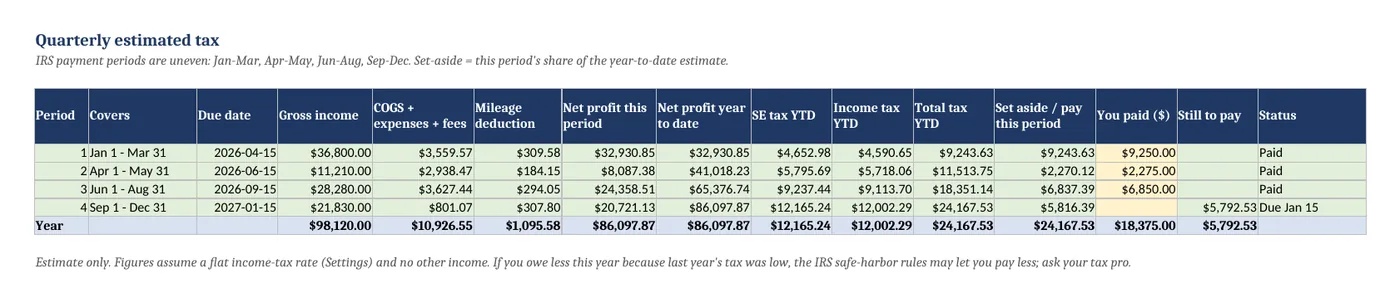
Screenshots (sample job)
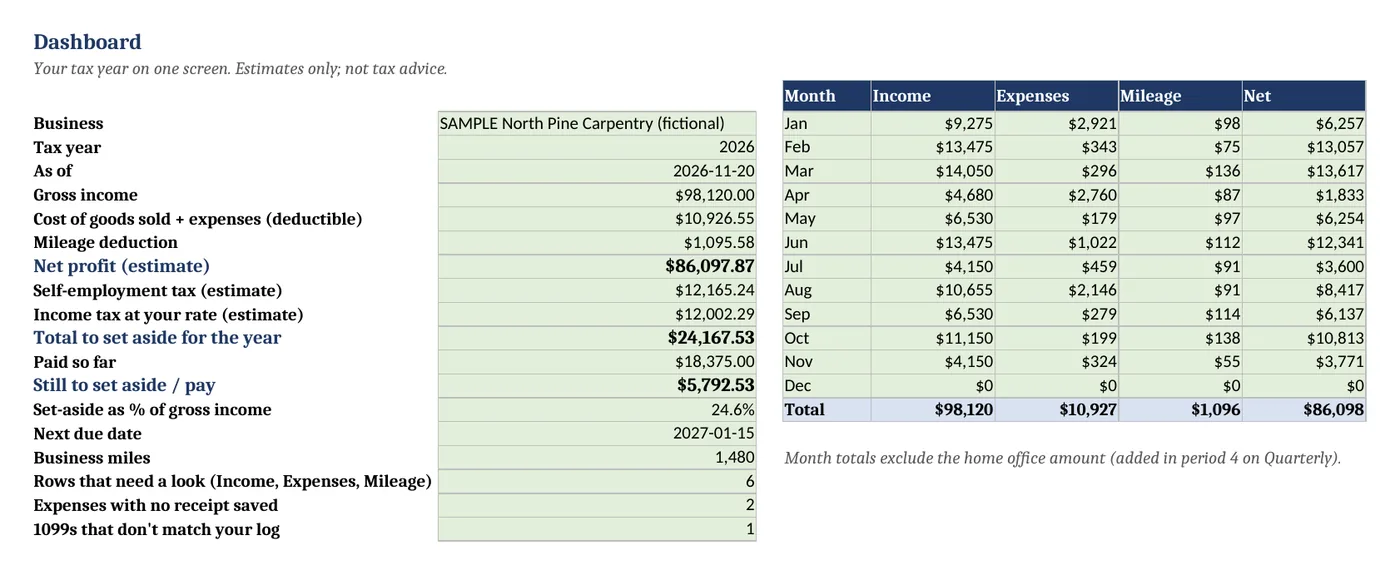
Know what to set aside. Log miles at the right rate. Hand your tax pro a clean Schedule C.
If you get 1099s for trade work, nobody is withholding tax for you. This workbook keeps the year in one file and tells you, as you go, roughly how much of each payment belongs to the IRS.
What's inside
- Income: every payment, with fees the payer or card app kept
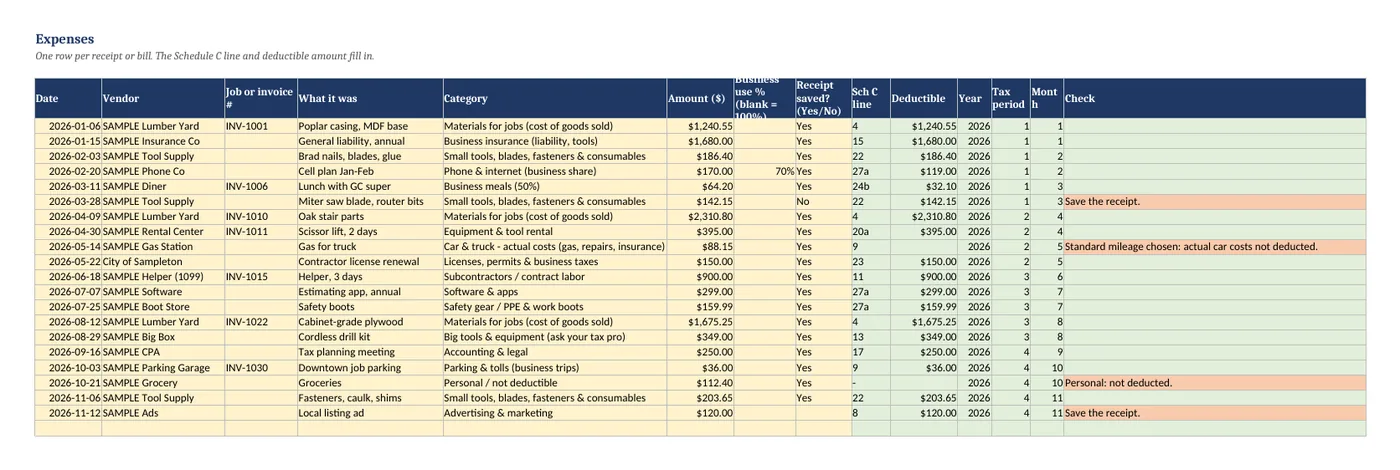
- Expenses: 25 trade categories (materials, small tools and blades, PPE and boots, tool rental, licenses, subs...) already mapped to Schedule C lines. Meals cut to 50%. Business-use % for things like your phone
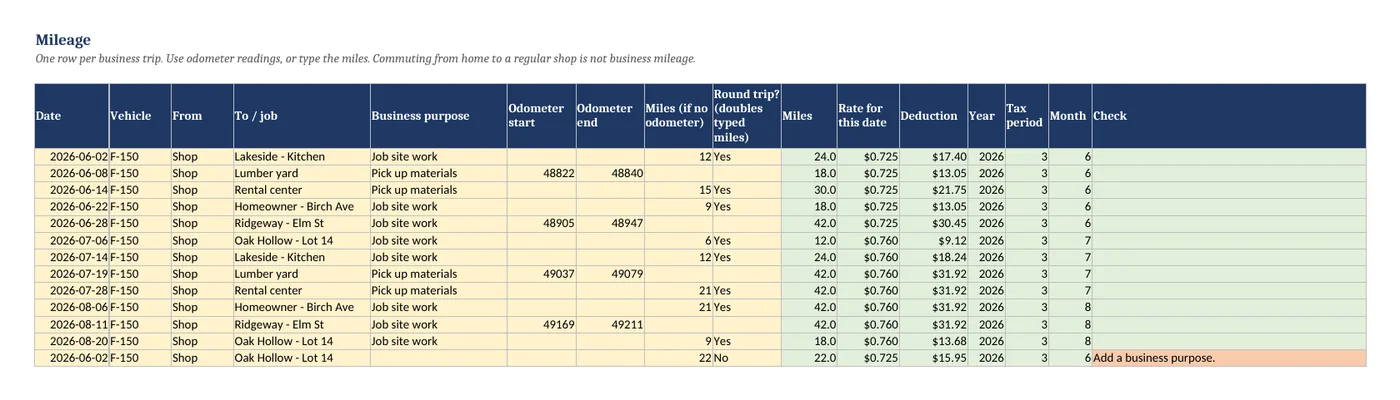
- Mileage: odometer or typed miles, round-trip toggle, and the IRS rate for each trip's date. 2026 changed mid-year (72.5¢ to June 30, 76¢ from July 1), and it's already in
- 1099 Check: type the 1099s you receive and see if they match what you logged
- Quarterly: what to pay for each IRS period (Jan-Mar, Apr-May, Jun-Aug, Sep-Dec), what you paid, what's left, and what's past due
- Schedule C Summary: your numbers in line order, lines 1 to 31
- Dashboard: gross, deductions, net profit, SE tax, income tax at your rate, set-aside %, next due date, and a month-by-month table
What it checks for you
- Receipts not saved for expenses of $75 or more (you set the amount)
- Actual gas and repair costs entered while you use the standard mileage rate (you can't do both on one vehicle)
- Trips with no business purpose, odometers that go backwards
- 1099s that don't match your log
- Rows dated outside the tax year
Who it's for
Self-employed carpenters, electricians, plumbers, HVAC techs, painters, handymen and 1099 subs who file Schedule C and do their own books or hand them to a preparer.
Important
Not tax advice. The set-aside is an estimate: self-employment tax is figured the Schedule SE way, and income tax uses one flat rate you enter. It doesn't include the 0.9% Additional Medicare Tax, the QBI deduction, credits, other income or state rules. Rates and thresholds sit in editable cells with their sources. Check your numbers with a tax professional before you file.
Compatibility
Excel 2016 or later (Windows or Mac) and Google Sheets. In Sheets, upload the .xlsx to Drive and open it with Google Sheets, importing the whole file. No macros, no subscription.
License
One person or business. Use it every year. Don't share or resell the files.
Refunds
If the workbook isn't useful, email us within 14 days of purchase and we'll refund you in full, no questions asked. After 14 days we still help if a file won't open or a formula is broken.
AI-use disclosure
The spreadsheet layout, formulas and listing text were drafted with AI tools and then reviewed, tested and corrected by us. Sample names and amounts are made up.
Questions or a file that won't open? Email 1c071a70@mail.grokbot.com.
Refunds and support
If the workbook isn’t useful, email us within 14 days of purchase and we’ll refund you in full, no questions asked. After 14 days we still help if a file won’t open or a formula is broken: 1c071a70@mail.grokbot.com.
AI-use disclosure
The spreadsheet layout, formulas and text were drafted with AI tools and then reviewed, tested and corrected by us. Sample names, prices and amounts are placeholders for fictional projects.
Instant download (zip with BLANK + SAMPLE .xlsx). Excel 2016+ and Google Sheets. No macros, no subscription. 14-day no-questions refund.
Also from Plumb Jamb
- Door & Hardware Takeoff Workbook ($39)
- Finish Carpentry & Trim Takeoff Workbook ($39)
- Change Order & T&M Ticket Log for Subcontractors ($29)
- Contractor Job Costing & Estimate Workbook ($29)
- Div 06-08 Estimator Bundle ($79)
- Subcontractor Compliance Tracker ($24)
- Contractor Office Bundle ($59)
- Free Door Schedule Starter